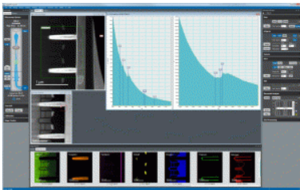
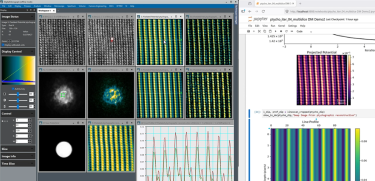
DigitalMicrograph® is the industry standard software for (scanning) transmission electron microscope ((S)TEM) experimental control and analysis, which people also know as Gatan Microscopy Suite®. DigitalMicrograph 3 is completely revamped and uses a new, much-simplified user interface. DigitalMicrograph 3 enables novice users to easily perform basic research applications, while it continues to provide the deep access and control highly experienced microscopists are used to and demand.
Recent highlights:
- Electron energy-loss spectroscopy (EELS)
- CountedEELS acquisition across all voltages with GIF Continuum® system
- Diffraction imaging
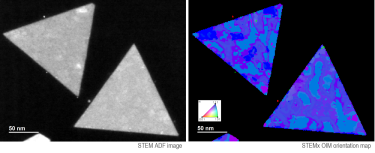
- Expands 4D STEM data analysis to include differential phase contrast (DPC)
- Simplifies micro-electron diffraction (MicroED) acquisition with Latitude® D software
- In-situ imaging
- Enables new in-situ data types, including EELS and STEM
- Automates the synchronization of multiple data sets, holders, and processing data
- Cathodoluminescence
- Adds wavelength- and angle-resolved cathodoluminescence for energy-momentum spectroscopy
Selected benefits of DigitalMicrograph software:
- Technique-centric workflow: Guides you through experimental setup, execution, and analysis
- Tabbed workspaces and data layout manager: Provides a user-friendly way to organize and manage data
- Dedicated view for live data: Clearly separates newly acquired data from prior experiments
- DigitalMicrograph and Python scripting: Uncompromised full control for expert users
- Expanded file format: Now included HDF5 support

Free DigitalMicrograph software
Download Software Learn more about the most recent version
Modules
Digital imaging software |
|
| Latitude D | Delivers the efficiency and high-throughput data collection that you expect from Latitude software to MicroED studies. |
| Latitude S | Sets a new standard for the efficient, high-throughput collection of low-dose, single-particle, cryo-EM datasets from Gatan’s cameras |
| In-Situ Explorer | Full in-situ control and data handling within DigitalMicrograph software. Module includes eaSI™ proprietary technology. |
| TEM AutoTune | Automates adjustment of focus, astigmatism, and misalignment |
| DigitalMontage® | Stage and optics control so you can seamlessly stitch images together |
| HREM AutoTune | Facilitate your HREM assays by automatically adjusting the critical imaging parameters of a TEM microscope focus, stigmation, and beam tilt |
| DIFPACK | Diffraction analysis package to automate the selection area of your electron diffraction (SAED) patterns and high-resolution lattice images of crystalline samples. Module includes eaSI proprietary technology. |
| HoloWorks | Computes live phase images from live holograms, allows for live phase unwrapping, and provides image stack acquisition and stack processing (including sample and interference-fringe drift correction), enabling high-resolution phase images at the 2pi/1000 level |
EELS, EFTEM & STEM software |
|
| STEM Diffraction Imaging | Allows you to acquire diffraction patterns pixel-by-pixel as a 4D data set. Module includes eaSI proprietary technology. |
| Advanced AutoFilter | Automates your multi-element EELS and EFTEM data acquisition experiments |
Datasheet
Applications
Compatibility
Tools
EELS App Scripts EELS.info WhatIsCL.info DigitalMicrograph Tips & Tricks
LOG4J AND LOG4SHELL VULNERABILITY
Gatan’s DigitalMicrograph application and Gatan Microscopy Suite (GMS) software suite, including all the plug-ins and modules developed by Gatan, do not use the Log4j framework and is therefore not exposed to the Log4Shell vulnerability.
DigitalMicrograph makes only very limited use of third-party software modules and only uses one that actually installs a Java Virtual Machine, which is necessary to run Log4j. This 3rd party module is developed by National Instruments. Gatan uses a National Instruments card to integrate the JEOL EDS detector, and NI’s statement is available here. National Instruments has indicated that the product we use is not affected.